Heading
Top  Previous  Next

Definition

H [=] heading

H
Heading command
=
optional modifier to set an absolute heading with zero being a positive direction on the x axis.
heading
Range -360 to [+]360 sets the heading relative to the current heading.


Usage

Use to change the current heading. Any subsequent command starts on the new current heading.

Example

Any change in heading is relative to the current heading. A positive change is clockwise and a negative, counter clockwise. Every shape has its own heading. Every shape starts with a heading straight up or north or, in absolute terms, a heading of 90 degrees. When the D2nc starts, shape 0 is active by default and the heading indicator is active in the shape display area.

The heading is changed by this H command or it can also be changed by the optional heading qualifier to the Draw, Jump, Arc, Warp, Convex and Concave commands.

The heading has a optional absolute qualifier which is invoked by setting the heading with the equal sign. It is recommended that you avoid using an absolute setting for the heading as it breaks the relative nature of the language and causes problems with rotating shapes with a warp. Having said that, it does provide function for some difficult shapes and has been made available for those instances. The absolute setting must be followed by a heading of 0 to <360 degrees and is not available as a qualifyer on those commands that support the heading qualifyer.

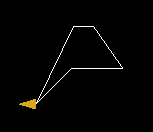
We take the following program:
h45
d.5,45
d.5,-125
d.5
h=180
d.2
&

and step through it:

clip0034

h45      Set heading 45 degrees clockwise from the initial 90 setting
d.5,45      Draw line .5 long then set heading 45 degrees clockwise

clip0035

d.5,-125   Draw line .5 long then set heading 125 degrees counter clockwise         
d.5      Draw line .5 long
H=180      Set the heading to an absolute heading of 180 degrees. Disregard current heading

clip0037

d.2      Draw a line .2 long
&      Close the shape leaving the heading unchanged