Jump
Top  Previous  Next

Definition

J distance[,heading] [ ! | @ ]

J
Jump command
distance
Distance in working units to jump in the direction of the current heading.
heading
optional range -360 to [+]360 sets the heading relative to the current heading.
!
optional line converter. Cause a line to be drawn to this point. Any sequence of jumps will be converted into a cutting line from the last cut or anchor point.
@
optional anchor this point. Excludes this jump being converted to construction line for a subsequent jump.


Usage

Jump on the current heading for the specified distance. Jump is used to position the tool with G00 moves when translated to g-code.

Example

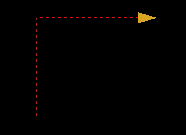
The jump works as you would expect but has a few qualifiers and some behaviour that needs further explanation. The jump, when translated to g-code, equates to the tool making rapid moves above the cutting plane at the safe Z height as set in constraints . In the shape display area the jump is represented by a red dashed line.

A single jump with a heading change produces the following:
clip0040
j1,90

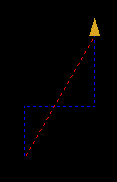
Consider a subsequent jump. Normally you should expect the tool to make a rapid move on the shortest possible path. To meet this expectation, when there are two or more jumps in a row, they are converted to construction lines (blue) and the resulting real jump or tool move calculated and shown in red.
clip0041
j1,90
j1


There are two qualifiers on the jump command, an @ (anchor) and ! (draw line to here).

There may have been a reason to have the tool follow both jumps in the previous example, to avoid a clamp perhaps. That would be one of the uses for the anchor.
clip0042
j1,90@
j1


Positioning with Jump (or the closest thing to relative coordinates)

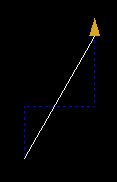
Jump can also be used to reach a position where you cannot possibly know the correct heading and line distance to that point. This is most useful when working from a drawing. Up .3 right .4 up.4 create a line to here....
clip0047clip0048clip0055clip0056

First follow the directions:

j.3,90
j.4,-90
j.4


Second convert the jump to a line:

j.3,90
j.4,-90
j.4!


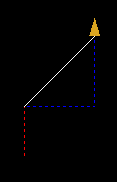
Third, lets assume the first jump was a positioning not a cutting move so lets anchor it:

j.3,90@
j.4,-90
j.4!

Fourth, if you actually wanted a cutting move instead of a positioning move you would use the draw

d.3,90
j.4,-90
j.4!