A shape is defined using the Shape Description Language.
Up to 10 shapes can be defined in the same program numbered from 0 to 9.
The shape selector buttons select the active shape or the shape you currently working with.
The small shape display buttons alongside the selector enable you to show or hide that particular shape.
Define Shape 0.

Define Shape 1. You can see that Shape 0 is defined but hidden by the blue shape display button.
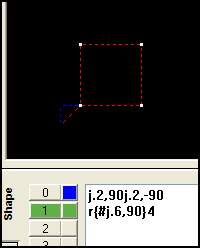
Click on the Shape 0 display button to toggle the display of shape 0 on so that it is displayed along with the active Shape 1.

Later on during path definition each of the operations, for example contouring or drilling, are performed on an entire shape definition. In this example Shape 0 could be left contoured while Shape 1 could be peck drilled.


